
 I-Share
Add a Top Warning Bar to Primo VE
Back to the Primo VE Customization Package: Shared CSS and JavaScript Solutions page
December 3, 2021
Objective: Add a top warning bar to Primo VE for announcements. For example, you could warn about system downtime or library closures.
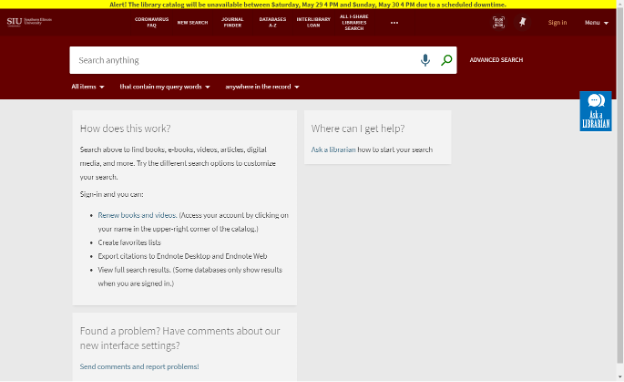
How to accomplish this: Please review the steps for working with the customization package and its files on the main Shared CSS and JavaScript Solutions page. This solution requires the following custom CSS code be added to the /VIEW_CODE/css/custom1.css file:
/* LOCAL BANNER */
body::before {
    content: "Add your custom text here to display in the banner!";
    display: inline-block;
    background: #FFFF00;
    text-align: center;
    width: 100%;
    font-weight: bold;
}
 /* END local banner */
You may adjust the text by changing the content field.
You may adjust the color of the banner from yellow (#FFFF00) by changing the background field hex code.
Download a text file with this custom CSS code for easy copying and pasting into your local custom1.css file.
Special thanks to Andrea Imre at SIC for contributing this CSS code.